

Your website is the hardest-working employee in your business. It never sleeps, never takes a vacation, and handles inquiries at 3 a.m. without complaint. But if it’s sitting on budget shared hosting, it’s probably working with one hand tied behind its back — loading slowly, vulnerable to attacks, and costing you conversions you’ll never even know you lost.
We’ve managed WordPress sites for hundreds of clients over two decades, and we’ve seen the same pattern play out dozens of times: a business outgrows its $5-a-month hosting, suffers downtime during a critical sales period, or gets hacked because their host’s security was essentially nonexistent. The decision to upgrade to dedicated managed WordPress hosting isn’t just technical — it’s a business decision that directly impacts revenue, reputation, and how much time you spend putting out fires instead of running your company.
In this article, we’ll walk through exactly why dedicated managed WordPress hosting matters for small and mid-sized businesses, what you actually get for the investment, and how to know when it’s time to make the switch.
What Dedicated Managed WordPress Hosting Actually Means
Let’s clear up the terminology first, because hosting companies love to throw around buzzwords that sound impressive but mean very little.
Dedicated Resources vs. Shared Hosting
On traditional shared hosting, your website lives on a server with hundreds or even thousands of other sites. You’re all sharing the same CPU, memory, and bandwidth. When someone else’s site gets a traffic spike or runs a poorly coded plugin, your site slows down too. It’s like trying to work in a crowded coffee shop where someone keeps unplugging your laptop to charge their phone.
Dedicated hosting means your site gets its own resources — either a physical server or a carved-out portion of server resources that’s reserved exclusively for you. Your site’s performance isn’t affected by your neighbors because you don’t have any.
What “Managed” Actually Includes
The “managed” part means your hosting provider handles the technical maintenance that keeps WordPress running smoothly and securely. This typically includes:
- Automatic WordPress core updates — applied safely, with rollback capability if something breaks
- Daily or real-time backups — stored off-server so you can recover from disasters
- Security monitoring and hardening — firewalls, malware scanning, and intrusion detection
- Performance optimization — server-level caching, CDN integration, and database tuning
- Expert support — people who actually know WordPress, not script-reading generalists
- Uptime monitoring — proactive alerts if your site goes down
The key difference from budget hosting: managed WordPress hosting providers take responsibility for outcomes, not just access to a server. If your site gets hacked, they help you clean it up. If it’s slow, they investigate why. If it goes down, they notice before you do.
Why Dedicated Managed WordPress Hosting Pays for Itself
The investment in managed WordPress hosting typically ranges from $50 to $500+ per month depending on your traffic and resource needs. That sounds like a lot compared to $5 shared hosting — until you calculate what downtime, slow speeds, and security breaches actually cost your business.
Speed Directly Impacts Revenue
We’ve run this test dozens of times across client sites: improve page load time by two seconds, and conversion rates increase measurably. Google’s own research shows that 53% of mobile users abandon sites that take longer than three seconds to load. If your site is slow because you’re on overcrowded shared hosting, you’re literally paying money to lose money.
Fast WordPress hosting solves this with server-level caching, optimized PHP configurations, and infrastructure designed specifically for WordPress. We host over 100 client sites on our managed infrastructure, and median load times sit under 1.5 seconds — not because we’re magicians, but because the hosting environment is built for performance from the ground up.
For an e-commerce site doing $50,000 a month in revenue, a 1% conversion rate improvement from faster load times is worth $500 monthly. The hosting pays for itself immediately.
Downtime Is More Expensive Than You Think
Shared hosting typically promises 99% uptime, which sounds great until you do the math: that’s 7.2 hours of downtime per month. For a local service business that generates leads 24/7, that’s dozens of potential customers who hit your site, found it broken, and called your competitor instead.
Website uptime solutions built into dedicated managed hosting typically deliver 99.9% or better — often with financial guarantees. More importantly, when something does go wrong, you have experts who respond in minutes, not days. We’ve recovered hacked sites at 2 a.m. because the business owner needed to be back online before their morning rush. That’s not possible when your support ticket sits in a queue with 10,000 others.
Security Breaches Cost More Than Money
We’ve cleaned up hundreds of hacked WordPress sites over the years. The direct costs — developer time to remove malware, security audits, potential ransom payments — are bad enough. The indirect costs are worse: lost rankings when Google blacklists your site, damaged reputation when customers see malware warnings, and the weeks of stress wondering if the hackers are really gone.
WordPress security services included in managed hosting stop most attacks before they happen through server-level firewalls, automatic security patches, and continuous monitoring. When breaches do occur, you have experts who know how to properly clean and harden the site — not just delete the obvious malware and hope for the best.
One client came to us after paying $3,500 to another developer to “fix” a hack, only to get reinfected three weeks later because the backdoor was never found. Proper managed hosting with real security would have cost less and prevented the problem entirely.
When Your Business Has Outgrown Shared Hosting
Not every business needs dedicated managed WordPress hosting right away. A brand-new blog with 100 visitors a month will run fine on budget hosting. But there are clear signals that it’s time to upgrade.
Traffic and Performance Red Flags
If you’re experiencing any of these, your hosting is holding you back:
- Your site slows down noticeably during business hours or after you publish new content
- You’ve already optimized images, installed caching plugins, and minimized code — but the site is still slow
- Your hosting provider sends warnings about “resource limits” or temporarily suspends your account
- You’re getting more than 5,000 visitors per month (the point where shared hosting starts to struggle)
- Page load times regularly exceed three seconds, especially on mobile
Business Maturity Indicators
Beyond technical symptoms, there are business reasons to upgrade:
Your website generates meaningful revenue — whether through e-commerce, lead generation, or bookings. When your site is a real revenue channel, not a brochure, the cost of downtime or poor performance exceeds the cost of good hosting.
You’re running paid advertising to your site. Sending $2,000 a month in Google Ads traffic to a slow, unstable website is like filling a bucket with a hole in it. Fix the bucket first.
You handle sensitive customer data. If you’re collecting payments, storing customer information, or operating in a regulated industry, security isn’t optional. Dedicated hosting for small business provides the foundation for real security — not just an SSL certificate and crossed fingers.
You don’t have time to be your own IT department. If you’re the owner-operator wearing ten hats already, spending hours troubleshooting hosting issues or recovering from attacks isn’t a good use of your time. Managed hosting means those problems become someone else’s job.
What to Look for in a Managed WordPress Host
Not all managed WordPress hosts are created equal. We’ve worked with dozens of hosting companies over the years — both managing our own infrastructure and inheriting clients from other hosts. Here’s what actually matters.
Performance Features That Make a Difference
Look for hosts that offer server-level caching (not just plugin-based), CDN integration, and modern PHP versions. The best hosts optimize their entire stack specifically for WordPress — from the operating system up through the web server configuration. Generic “WordPress-compatible” hosting can’t match the speed of purpose-built infrastructure.
Staging environments are non-negotiable if you ever plan to update your site. Being able to test changes in a clone of your live site before pushing them live prevents the “update broke my site” panic that happens constantly on shared hosting.
Support Quality Matters More Than You Think
The cheapest managed hosts offshore their support to script-reading generalists who can reset your password but can’t actually troubleshoot WordPress issues. The best hosts staff their support teams with WordPress experts who can diagnose plugin conflicts, optimize database queries, and explain what’s actually happening in plain English.
We’ve built our hosting business around senior-level support because we’ve been on the other end of terrible hosting support too many times. When a client’s site breaks at 9 p.m. on a Friday, they need someone who can actually fix it — not someone reading from a troubleshooting flowchart.
Backup and Recovery Capabilities
Daily automated backups are table stakes. What separates good hosts from great ones is how easy it is to actually restore from those backups. Can you do it yourself with one click, or do you have to open a support ticket and wait? Are backups stored off-server so they survive if the main server fails? Can you download them directly if you need to move hosts?
We maintain 30-day backup retention for all hosted clients and provide both automatic and on-demand restore options. We’ve seen too many businesses lose everything because their budget host’s “backups” were stored on the same server that failed.
Scalability and Flexibility
Your hosting should grow with your business. Look for providers that make it easy to upgrade resources as your traffic increases — ideally without downtime or complicated migrations. The ability to temporarily boost resources during peak seasons (Black Friday for e-commerce, tax season for accountants) is valuable for businesses with predictable traffic spikes.
Making the Switch: What to Expect
Migrating to dedicated managed WordPress hosting sounds intimidating, but good hosts make it straightforward. Most managed WordPress providers include free migration services — they’ll move your site for you, test it thoroughly, and only point your domain over once everything works perfectly.
The typical migration process takes 24-48 hours of elapsed time but requires minimal work from you. Your site stays live on the old host until the new one is ready, so there’s no downtime. Once the DNS switches over (which takes a few hours), you’re running on the new infrastructure.
What you should expect from your new host during migration:
- A complete backup of your current site before anything changes
- Testing of all functionality on the new server before going live
- Clear communication about timeline and any issues they discover
- Post-migration monitoring to catch any problems quickly
We’ve migrated hundreds of sites onto our hosting infrastructure, including complex e-commerce sites with thousands of products and membership sites with custom integrations. The sites that seem most complicated to migrate are usually the ones that benefit most from proper hosting — they were struggling under the weight of inadequate infrastructure.
The Bottom Line: Hosting Is Infrastructure, Not an Expense
Your website hosting isn’t an expense to minimize — it’s infrastructure that either enables or limits your business growth. Dedicated managed WordPress hosting costs more than budget shared hosting for the same reason that a reliable vehicle costs more than one that breaks down constantly: the total cost of ownership is actually lower when you account for downtime, lost revenue, security incidents, and your time.
For businesses where the website matters — where it generates leads, processes orders, or serves as the primary customer touchpoint — proper hosting pays for itself through faster load times, better security, higher uptime, and the peace of mind that comes from knowing experts are monitoring your site 24/7.
We built our hosting infrastructure because we got tired of watching clients struggle with hosts that didn’t take responsibility for outcomes. When we design a fast, secure website and then hand it off to budget hosting, we’re setting that business up to fail. That’s why we host what we build — and why we’re confident enough in our infrastructure to stake our reputation on it.
If your business has outgrown shared hosting, or if you’re tired of being your own IT department, it’s time to have a conversation about managed WordPress hosting. The investment is smaller than you think, and the return — in time saved, stress avoided, and revenue protected — is immediate.
Want to talk about whether managed hosting makes sense for your business? We’re happy to give you an honest assessment, even if the answer is “not yet.” Reach out to our team and we’ll walk through your specific situation — no sales pitch, just straight answers from people who’ve been doing this for 20+ years.
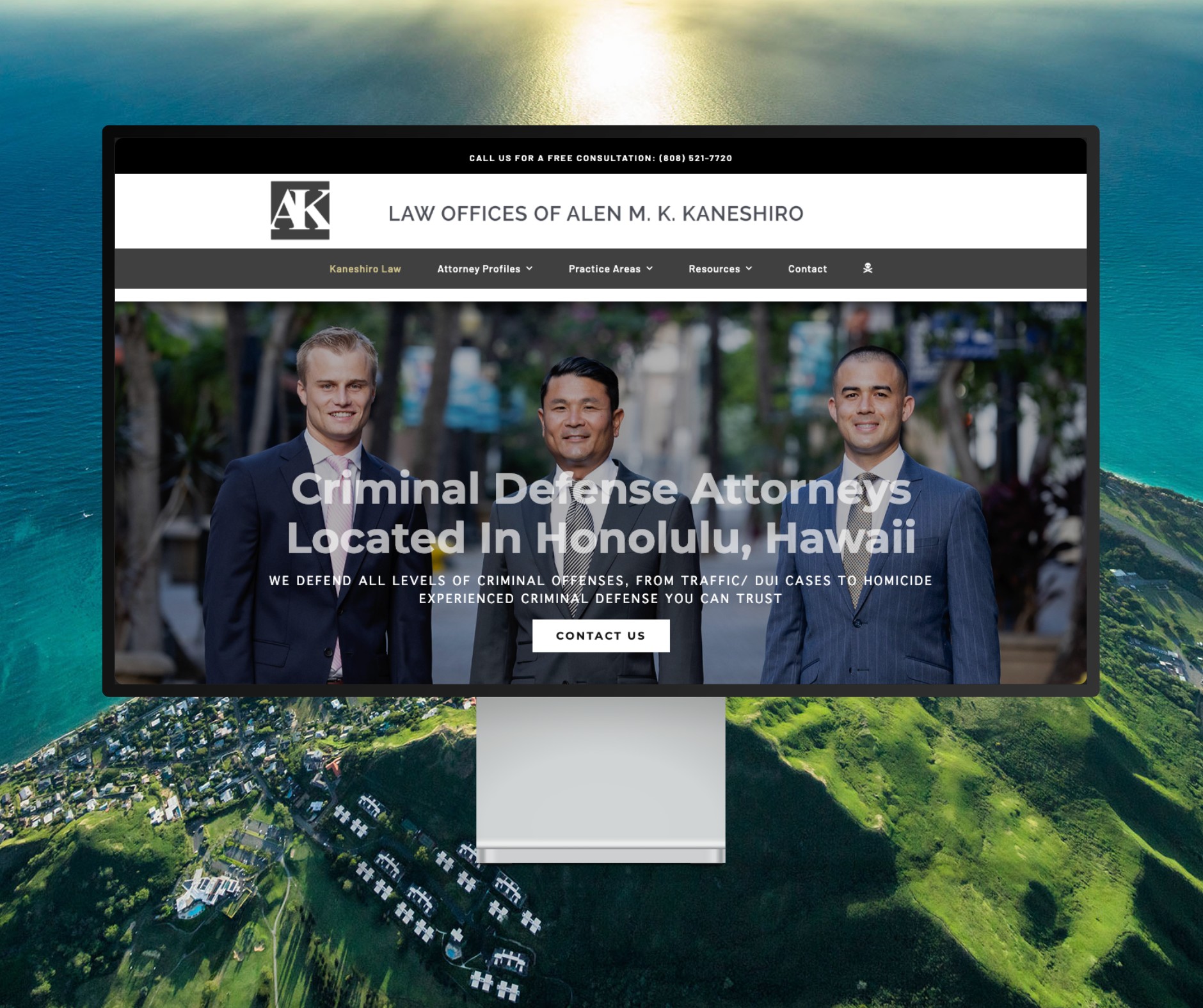
Featured Website: www.kaneshirolaw.com
Kaneshiro Law Firm, one of Hawaii’s most respected legal practices, partnered with The X Digital three years ago for a complete website redesign. Since then, we’ve maintained an ongoing relationship—handling updates, optimizations, and technical support around the clock. Our dedicated team ensures they’re never without assistance, while our enterprise-grade hosting provides 24/7 uptime monitoring and reliability. Kaneshiro Law Firm is one of many long-term clients who trust us to keep their digital presence running flawlessly.