

Your website has only a few seconds to convince someone they’re in the right place. Before visitors read your services, compare prices, or fill out a contact form, they notice your images and video. That’s why professional website photography and video can have a direct impact on trust, engagement, and conversions.
Stock images may be convenient, and phone photos can be useful in a pinch. However, generic or inconsistent visuals often make an otherwise capable business look less established than it really is. Professional visuals show people what you do, who you serve, and what they can expect from working with you.
In this guide, we’ll explain how high-quality photography and video support web design, SEO, branding, and sales. We’ll also cover which types of visual content are worth investing in, where businesses commonly waste money, and how to plan a shoot that produces useful assets for months or even years.
Why Professional Website Photography and Video Build Trust
People make quick judgments online. A potential customer may not know your company, your team, or the quality of your work yet. Your visual content helps fill in that gap. Clear, well-composed photos and authentic video make your business feel real, capable, and approachable.
This matters particularly for local service businesses, tourism companies, health providers, professional services, and e-commerce brands. In each case, customers are asking a version of the same question: “Can I trust this business to deliver what it promises?” Strong visual content helps answer that question before a sales conversation begins.
Show the real experience
Professional photography gives visitors a more accurate sense of your people, location, products, and process. A contractor can show completed projects and the team behind them. A vacation rental can show the property in its best, most honest light. A wellness provider can create a calm, welcoming impression before a prospective client ever walks through the door.
Video adds movement, context, and personality. A short introduction from the owner can make a company feel more personal. A behind-the-scenes clip can demonstrate care and expertise. A product demonstration can answer questions that several paragraphs of copy might not address.
Replace uncertainty with confidence
Low-quality images create friction. Dark interiors, blurry product shots, outdated team photos, or images that clearly come from a stock library can cause visitors to hesitate. That hesitation doesn’t always look like a complaint. Often, it simply means they leave and contact a competitor instead.
Professional visuals don’t need to be flashy. They need to be relevant, consistent, and true to your business. The goal isn’t to make a small company look like a multinational corporation. It’s to present the business you’ve worked hard to build in a way that matches the quality of the actual experience.
How Visual Content Improves Web Design and Conversions
Good web design is more than colors, fonts, and navigation. It also depends on the images and video that give each page purpose. When visual assets are planned alongside the website, they can guide attention, explain services, and encourage visitors to take the next step.
Our team often sees businesses try to build a website first and “add photos later.” That approach creates avoidable problems. The layout may be designed around generic images, the hero section may lack a strong focal point, and important services may have no relevant visuals at all. Planning web design visuals early produces a more cohesive result.
Support the customer journey
Different pages need different types of visual content. A homepage may need a compelling hero image or short brand video. A service page may benefit from process photos, before-and-after examples, or an explainer video. A team page needs approachable portraits. An e-commerce product page requires detailed images from multiple angles.
When every image has a job, your website becomes easier to understand. Visitors can quickly see:
- What you offer and who it’s for
- What your work, facility, or product looks like
- How your process works
- Why your business is different
- What action they should take next
Improve calls to action
Visuals can reinforce calls to action without distracting from them. For example, photos of a friendly team can support a “Request a Consultation” button. A short installation video can make a “Get an Estimate” form feel less intimidating. Lifestyle images can help shoppers imagine using a product, making an “Add to Cart” decision easier.
That said, professional photography and video can’t fix a confusing website on their own. Your pages still need clear messaging, fast load times, mobile-friendly layouts, and simple contact paths. Visual content is most effective when it works as part of a complete conversion strategy.
Professional Visuals Support SEO, Local Search, and AEO
Search engines primarily understand text, but visual content still contributes to how your website performs. High-quality images can improve the user experience, increase engagement, and make important pages more useful. Those signals support the broader quality of your website.
Images also create opportunities to provide search engines with useful context. Descriptive file names, accurate alternative text, captions, and surrounding copy help explain what an image shows. Alternative text, often called alt text, is a brief description used by screen readers and shown when an image cannot load.
Make local businesses more credible
For local SEO, original photos can help demonstrate that your business is real and active in the area you serve. Images of your team, vehicles, storefront, service area, projects, or facility can support your Google Business Profile and local landing pages.
This doesn’t mean uploading dozens of random photos. Choose clear, recent images that show the business accurately. A local customer is more likely to trust a real photo of your staff or completed work than a generic image that could belong to any company in town.
Create content answer engines can understand
As AI search tools and answer engines become more common, businesses need content that clearly demonstrates expertise and relevance. Original photos and video can support that effort by giving your website first-hand assets rather than recycled material found across the web.
Video transcripts, captions, descriptions, and supporting text can also make the information in a video easier for search systems to interpret. For example, a roofing company could publish a project video with a written explanation of the problem, materials used, timeline, and result. That combination is useful to people, traditional search engines, and AI systems looking for credible answers.
Visual content is not a substitute for technical SEO or useful written content. However, it strengthens the overall experience and gives your brand more original material to use across your website, Google Business Profile, social channels, and marketing campaigns.
What Types of Photography and Video Should You Create?
The right investment depends on your industry, goals, and sales process. You don’t need every possible type of content. Start with the visual assets that answer your customers’ biggest questions or remove the most hesitation.
Essential photography for most businesses
Most companies benefit from a core library of original images, including:
- Team and founder portraits: Help customers recognize and connect with the people behind the business.
- Work-in-progress photos: Show your process, professionalism, and attention to detail.
- Completed project photos: Provide proof of the quality customers can expect.
- Location and facility images: Set expectations and make the business feel more familiar.
- Customer experience images: Show your service in use, where appropriate and with permission.
- Product photos: Give shoppers the detail they need to make a confident purchase.
For e-commerce brands, e-commerce photography is especially important. Product images should be consistent in lighting, framing, and background. Include detail shots, scale references, multiple angles, and lifestyle photos when they help explain the product. A well-designed product page can still lose sales if the images leave shoppers guessing.
Video formats worth considering
Video does not always mean producing a polished television commercial. In many cases, short, focused clips are more useful:
- A 30- to 90-second founder or company introduction
- A service or product demonstration
- A customer testimonial or case study
- A behind-the-scenes look at your process
- A property, facility, or destination walkthrough
- Short educational videos answering common customer questions
Capture footage in both horizontal and vertical formats when possible. Horizontal video works well on websites and YouTube, while vertical clips are suited to platforms such as Instagram, TikTok, and Shorts. A single well-planned production can produce many pieces of business video content instead of one asset that gets used once.
How to Plan a Website Photography and Video Shoot
The best results come from planning around business goals, not simply collecting attractive images. Before scheduling a photographer or videographer, identify where the assets will be used and what you want visitors to do after seeing them.
Start with a practical shot list
Review your current website and list the pages that need new visuals. Then identify gaps. Do you need a better homepage image? Are your service pages missing project examples? Does your team page show employees who left several years ago? Are your product photos inconsistent?
Build a shot list that includes people, spaces, products, details, and actions. Include multiple compositions for different placements, such as wide images for banners and vertical images for mobile screens. If video is part of the plan, write down the questions you want answered rather than relying entirely on improvisation.
Prepare your people and location
Clean and organize the areas that will appear on camera. Confirm schedules, permissions, uniforms, branded materials, and customer releases where needed. If employees will speak on video, give them the key points in advance. They don’t need to memorize a script, but they should know the purpose of the video and the questions they’ll answer.
Also, plan for multiple uses. A single shoot might provide homepage images, service-page content, team photos, social media clips, email assets, and future blog illustrations. This is one reason professional production can be more cost-effective than it first appears.
Protect performance and accessibility
Large images and uncompressed video can slow down a website. Ask for files prepared for web use, and make sure your development team handles compression, responsive image sizes, lazy loading, captions, and descriptive alt text. A beautiful asset that makes a page frustratingly slow is not doing its job.
Finally, use real content whenever possible, but don’t pretend a photo is candid if it was heavily staged. Customers appreciate professionalism, yet they also respond to authenticity. The strongest visual strategy combines quality production with an honest representation of your business.
Conclusion: Turn Your Website Into a More Trustworthy Sales Tool
Professional website photography and video are not decorations added after the important work is finished. They help explain your offer, establish credibility, support web design, improve the customer experience, and give your marketing team original content to use in many places.
You don’t need to produce everything at once. Start with the pages and customer questions that have the greatest effect on revenue. Refresh outdated team and location photos, document your best work, and create a few short videos that demonstrate your expertise. Then make sure those assets are optimized and placed strategically throughout your website.
At The X Digital, we look at photography and video as part of the larger digital system: branding, website performance, SEO, conversion strategy, and long-term growth. If your current visuals no longer reflect the quality of your business, a focused content plan can make your website more credible and more useful from the first visit.
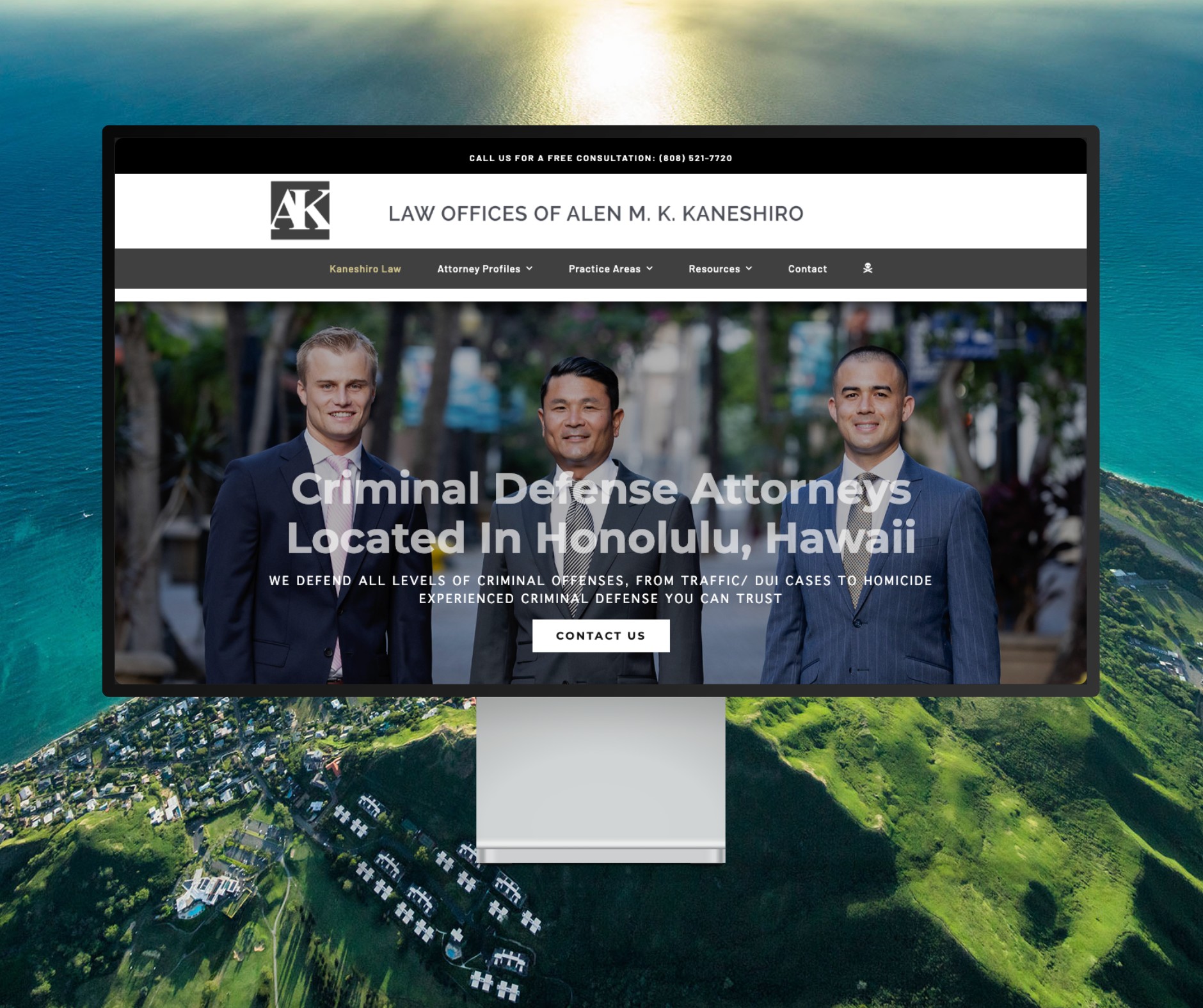
Featured Website: www.kaneshirolaw.com
Kaneshiro Law Firm, one of Hawaii’s most respected legal practices, partnered with The X Digital three years ago for a complete website redesign. Since then, we’ve maintained an ongoing relationship—handling updates, optimizations, and technical support around the clock. Our dedicated team ensures they’re never without assistance, while our enterprise-grade hosting provides 24/7 uptime monitoring and reliability. Kaneshiro Law Firm is one of many long-term clients who trust us to keep their digital presence running flawlessly.